Binary search:
Binary search is less time taking than linear search as it starts in the middle of a sorted array, and determines on which side the value is.
Steps for binary search algorithm:
- Firstly before applying direct searching on array, we have to sort the array. for sorting algorithm you can refer this link as: http://www.stepbystepjava.com/2018/04/26/bubble-sort-in-c
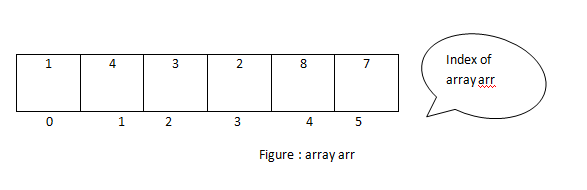
- let suppose we have an “array arr “arr[6] = { 1, 4, 3, 2, 8, 7 } and want to search element 7 in array;
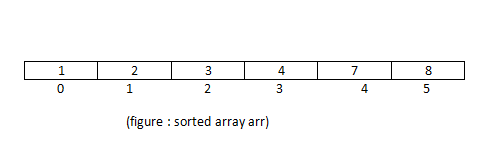
- now sort this array by any sorting algorithm or follow above link for sorting. After sorting this it will be like {1,2,3,4,7,8}. apply binary search algorithm on it.
- Find mid index of array arr:
mid = (start index + end index) /2
- check for the element at mid index in array arr:
if(arr[mid] == element )
- check if element is greater than arr[mid] element then
start index = mid -1 otherwise end index = mid +1
- go to step 4 until beg is greater than end.
Here in this program, I am assuming that my array is already sorted so applying binary search on it directly.
Program :
#include <stdio.h>
#include <conio.h>

int main()
{
 int arr[5], i,element,mid,beg,end,flag=0;

 printf("Enter elements for array.");
 for(int i=0; i<5; i++){
    scanf("%d", &arr[i]);
 }

 printf("enter a element that you want to search");
 scanf("%d", &element);

//code for binary search
 beg = 0;
 end = 4;

while(beg <=end && element != arr[mid]) {
    mid = (beg + end)/2;
    if(element == arr[mid]){
      printf("element %d found at %d", arr[mid], mid);
      flag = flag + 1;
    }
    else if(element < arr[mid]){
     end = mid-1;
    }
    else{
     beg = mid + 1;
    }
}

if(flag == 0){
  printf("item not found");
}
return 0;
}
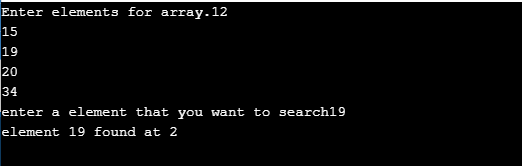
Output: