Hi people, hope you are doing good, today we are going to learn, how can we create MySQL database programmatically. Lets start;
- First we will create the connection with MySQL. you can check here how to create connection with MySQL.
$conn = new mysqli($hostname, $userName, $password);
- Create a SQL query for creating database “tempDb” in the MySQL.
$sql = "CREATE DATABASE tempdb";
- Then we will execute this query that we have created above.
$conn->query($sql);
Complete Code :
<?php
    $userName = "username";
    $password ="pass";
    $hostname = "localhost";

    //create connection
    $conn = new mysqli($hostname, $userName, $password);
    if ($conn->connect_error) {
        die("Connection failed: " . $conn->connect_error);
    }

    echo "Connected successfully";

    // Create database
    $sql_create_query = "CREATE DATABASE tempDb";
    if ($conn->query($sql_create_query) === TRUE) {
       echo "Database created successfully";
    } else {
       echo "Error creating database: " . $conn->error;
    }

    $conn->close();
?>
Now create a PHP file, paste the above code and execute it.
Output:
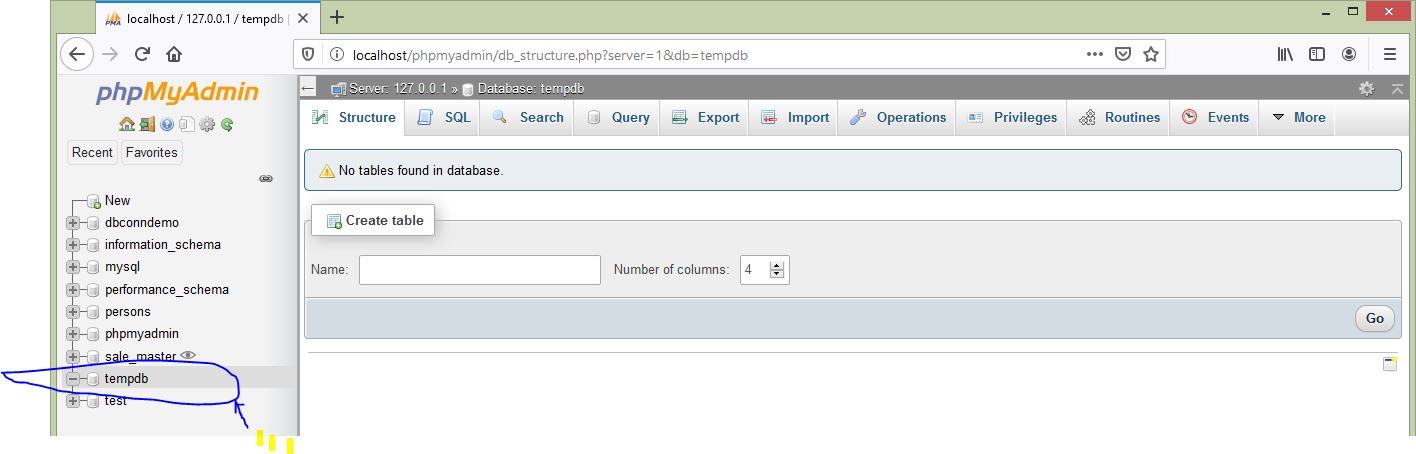
Then go to our MySQL workbench or phpmyadmin and Ta-da! there is a new database created named tempdb, as it is created at my end, you can see in below Image.